An IP camera can record without the Internet when the camera, CloudlessCam computer, and storage target remain reachable on the same network. The Internet and the local network are not the same thing. A router or switch can connect devices even when the connection to the outside world is unavailable.
Whether this works with your camera depends on the model. A camera that exposes its stream only through a manufacturer service remains Internet-dependent. A camera with local RTSP or ONVIF access can be reached directly by your own recording software.
What can continue during an Internet outage
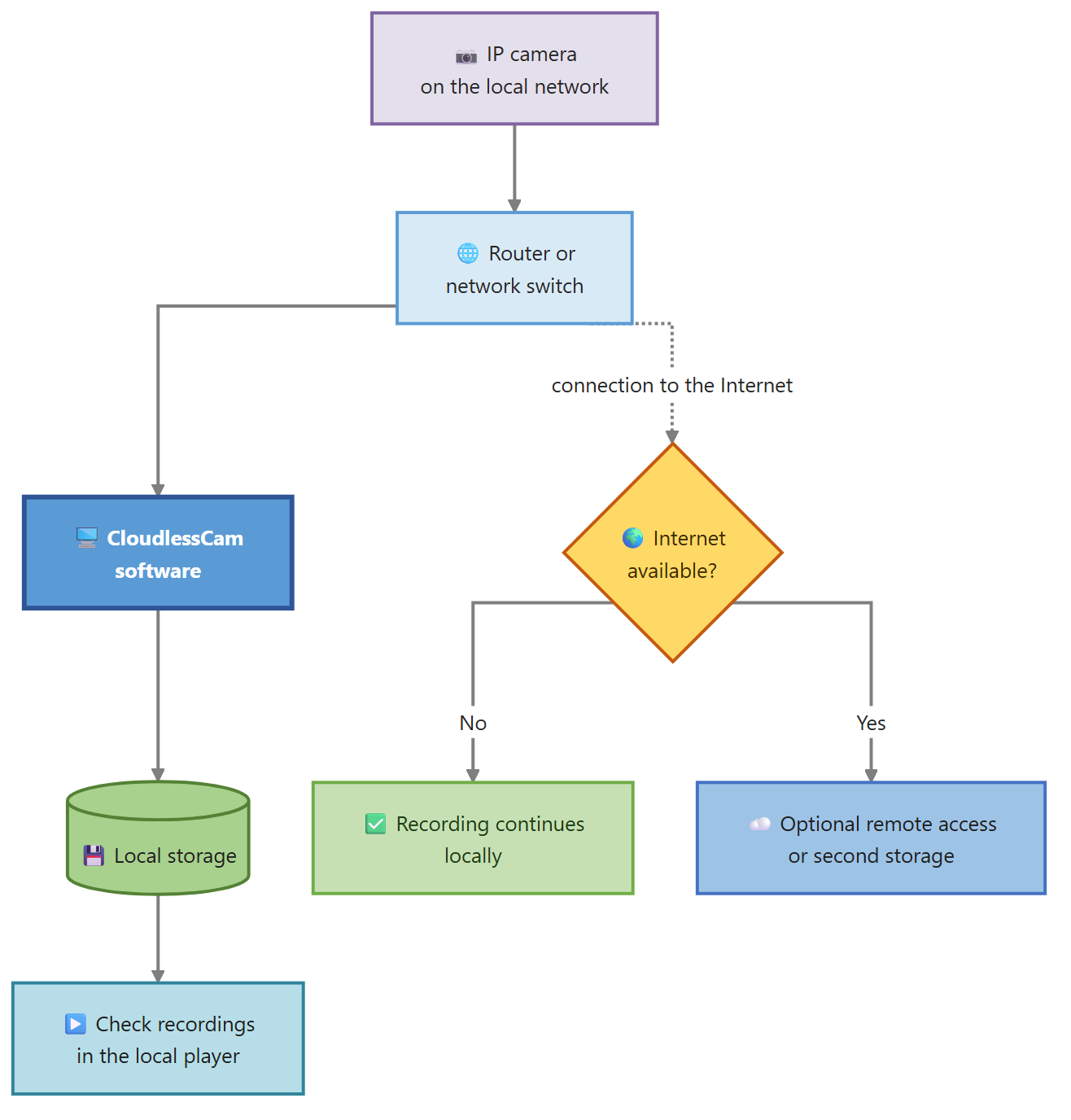
In the illustrated setup, the camera, CloudlessCam, and local storage are inside the same network. Internet access is needed only for optional tasks such as updates, remote storage, or access from outside.
| Function | Possible without the Internet? | Requirement |
|---|---|---|
| Live view on the local network | Yes | Direct camera stream is reachable |
| Local video recording | Yes | CloudlessCam and the target path are local |
| Recording to a local NAS | Yes | NAS is reachable on the local network |
| External cloud storage | No | Connection to the service is required |
| Access while away | Not directly | A protected network path such as a VPN is required |
| Software update | Later | Internet is needed to download it |
This separation shows which functions genuinely depend on the Internet and which need only a stable local network.
Wi-Fi can continue working without the Internet
A Wi-Fi camera does not necessarily need an active Internet connection. It still needs the wireless access point and a local IP address. If only the Internet connection fails, the router and Wi-Fi can often continue operating normally.
The situation changes if the router restarts, the camera loses its address, or the manufacturer ties local streaming to a previous online login. Where possible, create a DHCP reservation and deliberately test operation with the Internet line disconnected.
Prepare the offline test before buying
Check the product description and the manufacturer’s documentation:
- Does the exact model provide RTSP or ONVIF?
- Does the feature first need to be enabled in an app?
- Does the camera require continuous power?
- Can you create a local camera account?
- Does the stream work without a connection to the manufacturer service?
Battery and cellular cameras are often designed for event-driven cloud operation. They are not automatically suitable as continuous sources for a local recording software.
How to test CloudlessCam without the Internet
Set up the workflow while the Internet is working if the camera or software needs it for installation and updates. Then perform the actual test:
- Keep the camera and CloudlessCam computer on the local network.
- Disconnect only the Internet connection of the test network.
- Open the local live view.
- Create a short recording on local storage.
- Play the file.
- Restore the Internet and check optional transfers.
Do not use a production security installation for this experiment. The test should reveal dependencies without putting important recordings at risk.
Once the local path works, install CloudlessCam and perform the camera test in practice.
Limits of a completely isolated network
Without the Internet, external time sources, updates, and remote access are unavailable. An incorrect system time makes it harder to find recordings later. An isolated setup therefore needs a local time strategy and a planned process for verified updates.
A NAS may also depend on additional services that are not automatically available offline. Check the actual write path instead of relying only on a green network indicator.
Frequently asked questions
Does CloudlessCam continue recording during an Internet outage?
Yes, if the camera, CloudlessCam, and selected storage target remain reachable locally. Transfers to external storage wait until the connection is restored.
Can Wi-Fi still be used without the Internet?
Yes. The local Wi-Fi network can continue connecting devices. The router or access point itself must remain operational.
Can I use an IP camera without any router?
A direct or separate camera network is technically possible, but it still needs addressing and a reachable connection between the camera and recording software. For most users, a local router or switch is simpler.
Will a battery camera work with an NVR without the Internet?
Not automatically. Many battery cameras do not provide a permanent RTSP or ONVIF stream. Check the exact model and its operating conditions.
Conclusion
An IP camera without the Internet works reliably when all essential components remain local. Check not only the live view, but also file creation, time information, and playback. Install CloudlessCam and run a controlled offline recording test with a non-critical camera.